Video · Video Editing
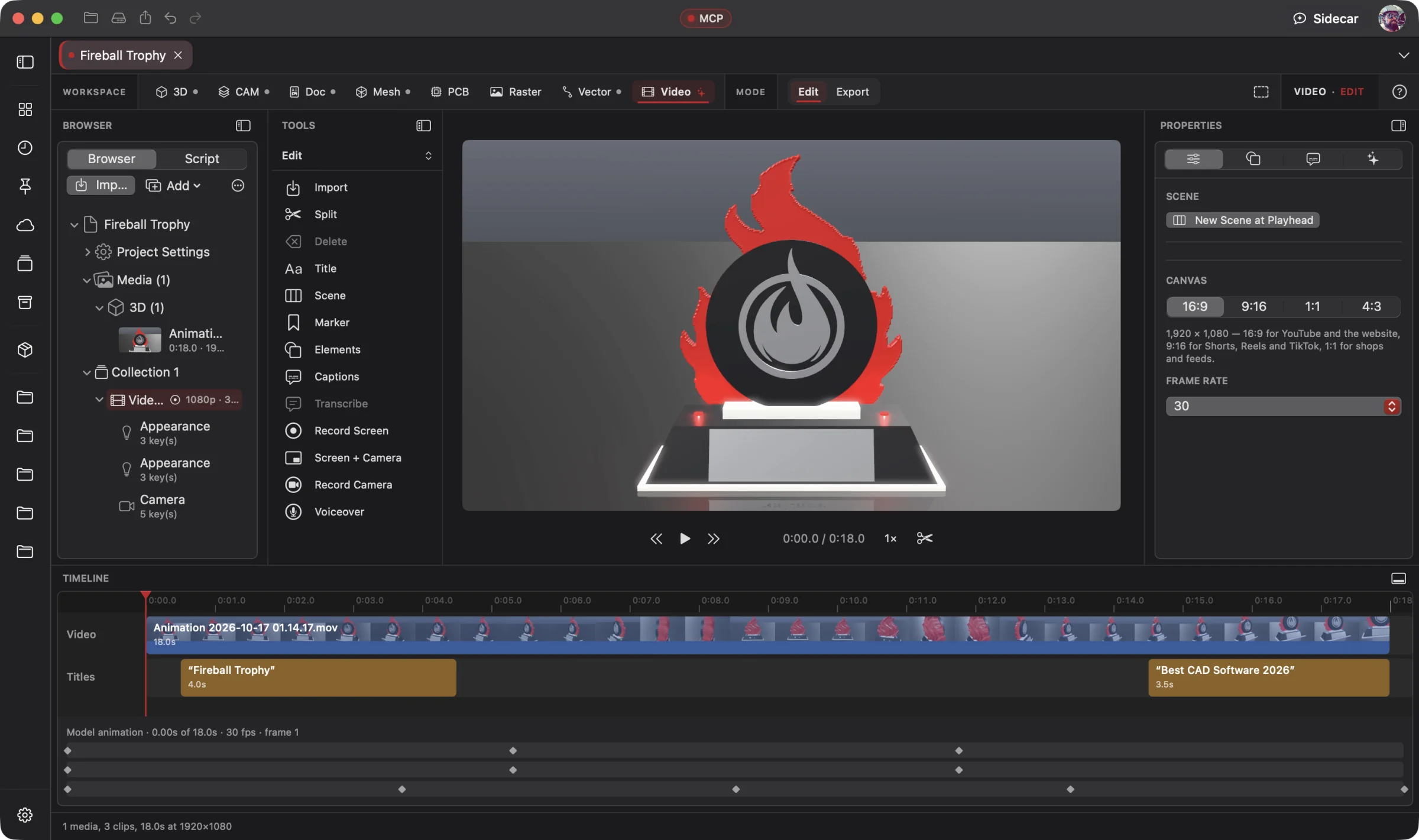 Enlarge
Video Editing
Edit the video with the media browser, tools, canvas settings and timeline in view.
Video Workspace
Show customers how to assemble, install and use the product you designed. Direct your AI to edit workshop footage, model-based assembly sequences, voiceover, titles and captions into a clear YouTube how-to. Professional editing tools, with AI at the controls from the start.
Connect your preferred AI through native MCP, use Wrangler to manage your providers and supported local models, or choose built-in Sidecar for focused work. Your AI creates; you direct, review and refine. Explore AI Workflows
Free 3D Workspace · One project · No credit card
macOS · Windows · Ubuntu · iOS · iPadOS · Android
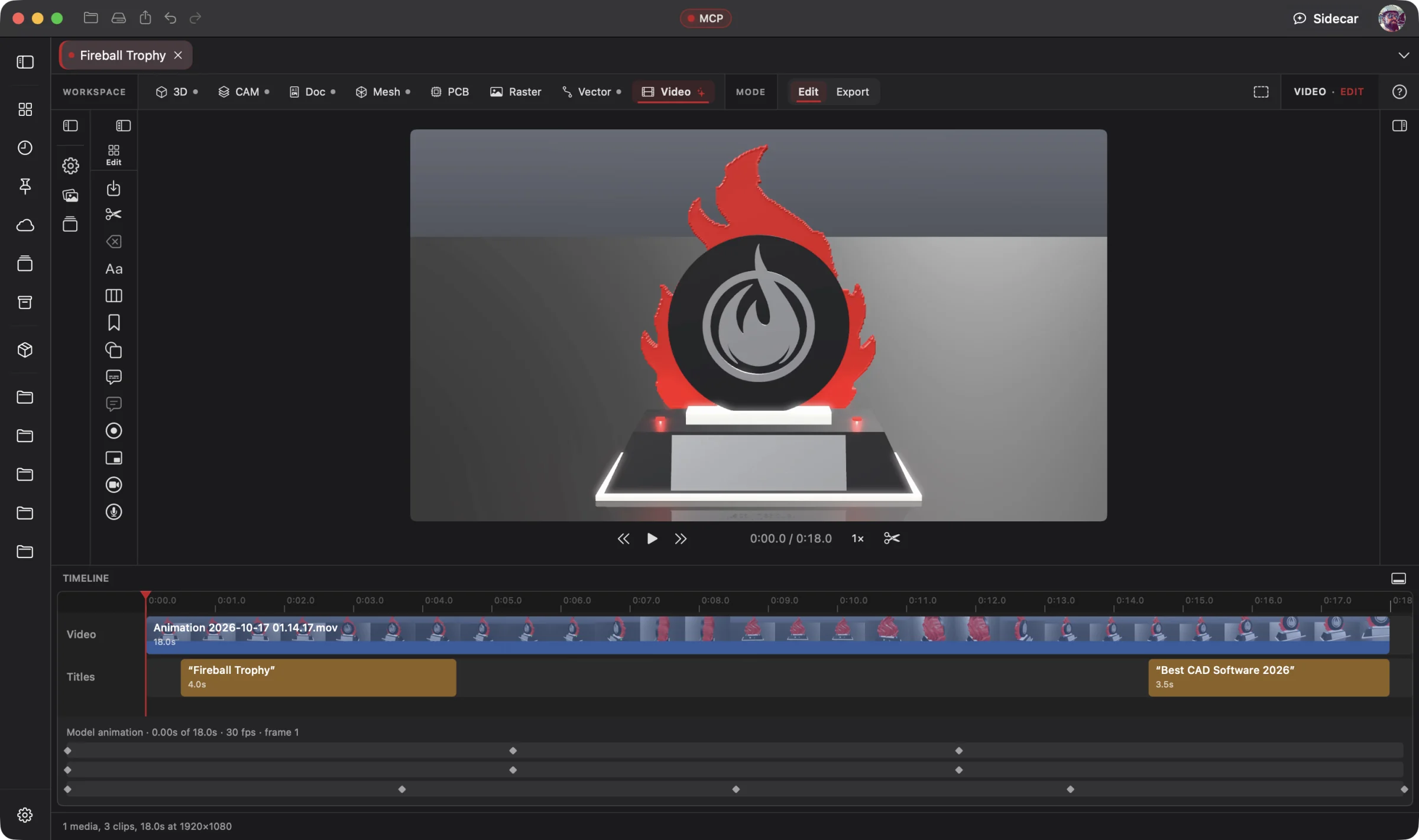 Enlarge
The trophy video on the timeline, with title clips and animation tracks beneath the preview.
Video is part of one AI-driven design workflow: a reference image becomes artwork, physical parts, manufacturing jobs, electronics, assembly instructions and a product video. Your AI works across all eight workspaces in one project; you steer and review.
Bring an idea or the design you already started. Through native MCP, your AI sees the project geometry and makes real changes. Fireball Wrangler brings your provider accounts and supported local models together, with discovery and connection to Fireball apps when their MCP access is enabled. Built-in Sidecar handles focused tasks.
Full editing goes with you: native apps across macOS, Windows, Ubuntu, iOS, iPadOS and Android. Use touch, Apple Pencil on supported iPads, or mouse and keyboard. Windows to Mac to Ubuntu, the same .fireballdesign file keeps every workspace together. Choose cloud sync to continue on your phone, tablet or computer.
Designer is in pre-release. This site describes the complete product; download availability follows the published builds. AI capabilities depend on your chosen model and tool support.
The Fireball Trophy Project
Real screenshots from Designer v0.19.0 on macOS. Open any image for a closer look.
Before and after
Today
Your customers need assembly and usage instructions, but the useful steps are scattered across workshop footage, model views and written notes.
With Fireball Designer
Your AI assembles a clear how-to: show each part, demonstrate the steps, add narration and captions, then export for YouTube and link it from the assembly guide.
The bridge: one AI-controlled editing workflow combining real footage, model animation, timeline tools, audio, titles and captions.
What it’s for
Make customer assembly, installation and product-use videos for YouTube and your support pages. A professional editing workspace with AI control built in from the start. Combine real footage, timeline editing, audio, titles, color and model-based animation. Direct your AI to assemble and refine the cut, or take the controls yourself.
It's local: transcription runs on your Mac, footage stays on your disk (any drive, any size), and the export templates know what YouTube, Shopify, Etsy, eBay and Amazon each accept. Change the model later and the clips are flagged to render again.
Headline features
Direct your connected AI to arrange footage, refine timeline edits, shape audio, adjust color and add titles using the editing tools themselves.
For you: your direction becomes real edits you can review and refine.
Hero, exploded, assembly, mockup and sign templates, rendered from the 3D project with its name, measured facts and leader-line callouts that follow the model as it turns.
For you: a listing video without a camera or a turntable.
On-device, word-timed transcription; delete words to cut every track; remove ums and long pauses in one step, with cuts snapped to the quietest moment.
For you: editing a talk-through takes minutes, not an evening.
Burned-in captions in clean, box, outline or highlight styles, where each word lights up as it's said, or SRT and VTT files alongside.
For you: most social video is watched muted.
Each step of a Doc manual becomes a scene, held while a voice reads the step.
For you: the video your manual's QR code points to, made for you.
Record a window, an app or the display, your camera, or both in one take as picture-in-picture, with a 3-2-1 count-in.
For you: walk through a build with your face in the corner.
Scene layouts, backgrounds, titles, shapes, timers and waveforms, keyframes and punch-ins, transitions, colour looks, and background removal without a green screen.
For you: a polished video without a motion-graphics app.
Voice isolation, music that ducks under speech, beat markers, a mixer, loudness normalised per platform and voice, music and effects stems.
For you: it sounds right on a phone speaker and on YouTube.
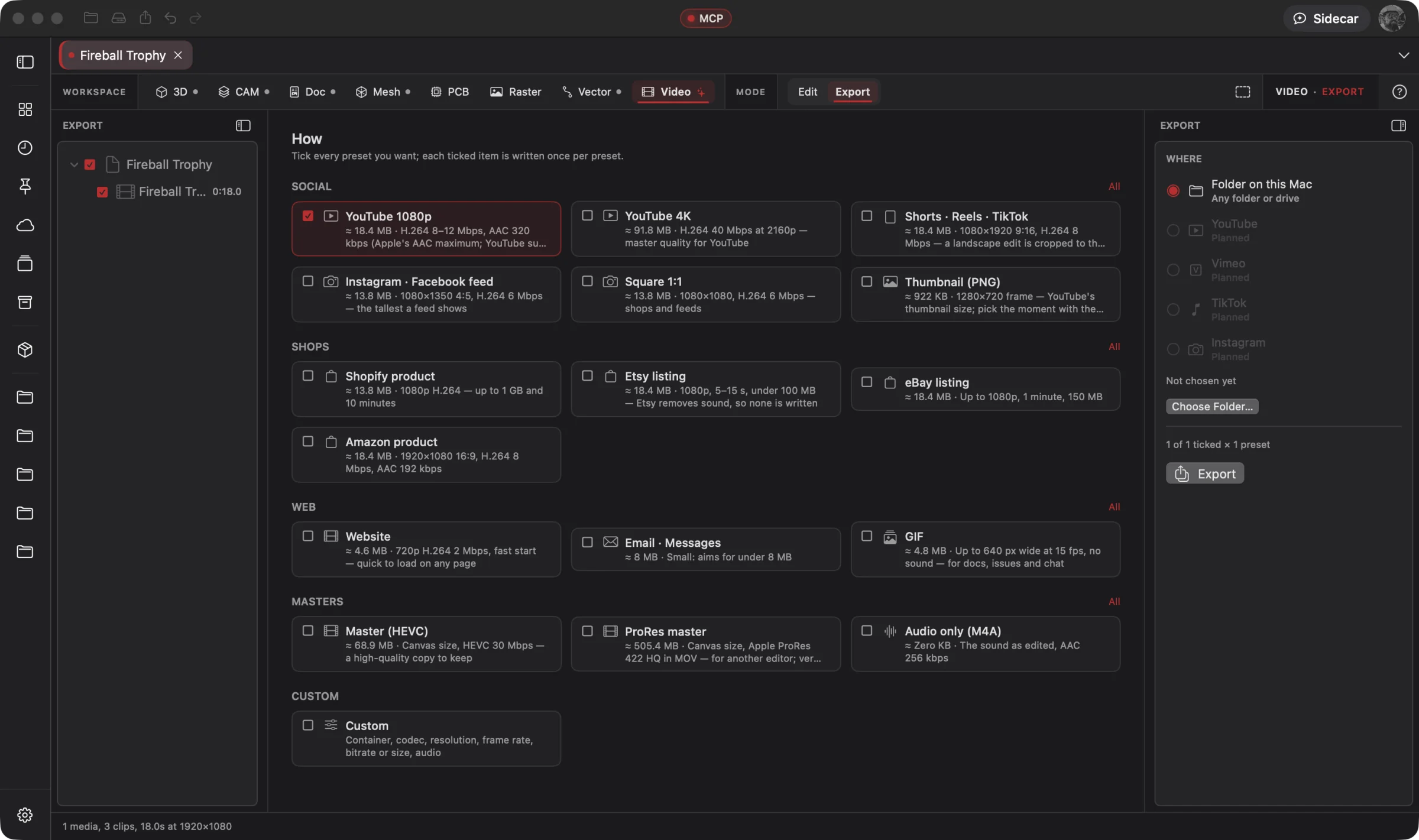
16 templates (YouTube, Shorts and Reels, Instagram, Shopify, Etsy, eBay, Amazon, website, email and more), batch groups, a size target, a pre-flight, auto-reframe to 9:16, and a converter for any movie file.
For you: each store gets the file it accepts, first time.
Multicam, grading and scopes, compound clips and tracking; AI-generated video and voice; stock media.
For you: more room to grow without leaving the project.
Built-in Sidecar
Sidecar helps with a short caption, a focused timeline change or an export check. Transcription and editing tools belong to Designer; Sidecar helps you use them for a small task.
You
Tidy this build video, caption it, and tell me what a Shorts export will look like.
Sidecar
→ transcribed on this Mac · removed the ums and pauses over a second · highlight captions · Shorts estimate ready, with anything over the limits flagged. Undo available.
Small tasks are Sidecar’s sweet spot. Quick explanations, a focused edit or help running a built-in tool. Longer projects and repeated tool calls can use Credits quickly.
Sidecar Bronze is included with Designer Pro and Commercial at no extra charge; other plans can use its free tier. Designer works completely with the panel closed.
Find the right AI help for your work →MCP · bring your own assistant
Connect your preferred compatible AI to Designer through native MCP. Let it inspect the actual project, create the first draft and refine the design through editable, undoable tool calls.
The whole timeline is on MCP (51 editing actions), plus export and convert. A compatible assistant can help plan the edit, use your model, check the framing and prepare exports for the destinations you choose.
# Claude Code, connected to Fireball Designer over MCP
> Make an exploded product video of the stand with callouts, and render it for every shop.
Four MP4s (Shopify, Etsy without sound, eBay and Amazon) and a manifest, each within that platform's limits, with anything too long flagged.
Example prompt and the tool calls it takes. Designer’s MCP server is built into the app, off until you switch it on, and scoped to what you share. No Sidecar subscription is needed. Your assistant uses its own provider account, billing and usage limits; review its work before using the result.
Workflows
One project, every workspace
Every workspace keeps its work in the same .fireballdesign file, so a hand-off is a button (or one tool call), not an export and a re-import.
Fireball Designer Warehouse connects the maker community to your studio. Discover shared projects, like the ideas you love, save them to collections and follow the makers, then open a design and make it yours within its sharing terms. Ask your AI for changes, prepare your build and share what you learn with the next maker. Find It. Make It Yours.
renderModelClip, rerenderModelClips).
makeHowToVideo).
Preliminary pricing
Unlimited 3D projects start at $5 a month. Add the Video Workspace for another $5 a month: $10 total (or $110 a year). Designer Pro includes all eight workspaces for $25 a month. You can start with one 3D project for free. One Fireball account works across your Fireball apps. Under ten employees you sell what you make on any paid plan.
See Designer plansFAQ
MP4, MOV, M4V, M4A, MP3, WAV, AIFF, PNG, JPEG and HEIC in, referenced where they are. Out: MP4 (H.264 or HEVC), ProRes, GIF, M4A, PNG thumbnails, SRT and VTT captions, chapters and audio stems. WebM isn't written.
No. Transcription runs on your Mac (it needs macOS 26), and footage stays on your own disks. Only the words Sidecar writes for you, such as titles and translations, use Sidecar.
No. Product videos render from the 3D model, so a listing video needs nothing but the project.
Yes: aim for a size such as 8 MB and it measures a sample encode before rendering, and each template respects its platform's limits (Etsy's files are written without sound, since Etsy strips it).
Native apps across macOS, Windows, Ubuntu, iOS, iPadOS and Android, with full design editing on mobile. Use touch, Apple Pencil on supported iPads, or mouse and keyboard. The same .fireballdesign file carries your project across platforms; choose cloud sync to continue on another device. Download availability follows the published pre-release builds.
Designer is free to start. The Video Workspace is one of the $5-a-month add-ons, or part of Designer Pro. Pricing is a draft until launch.