PCB · Circuit Editing
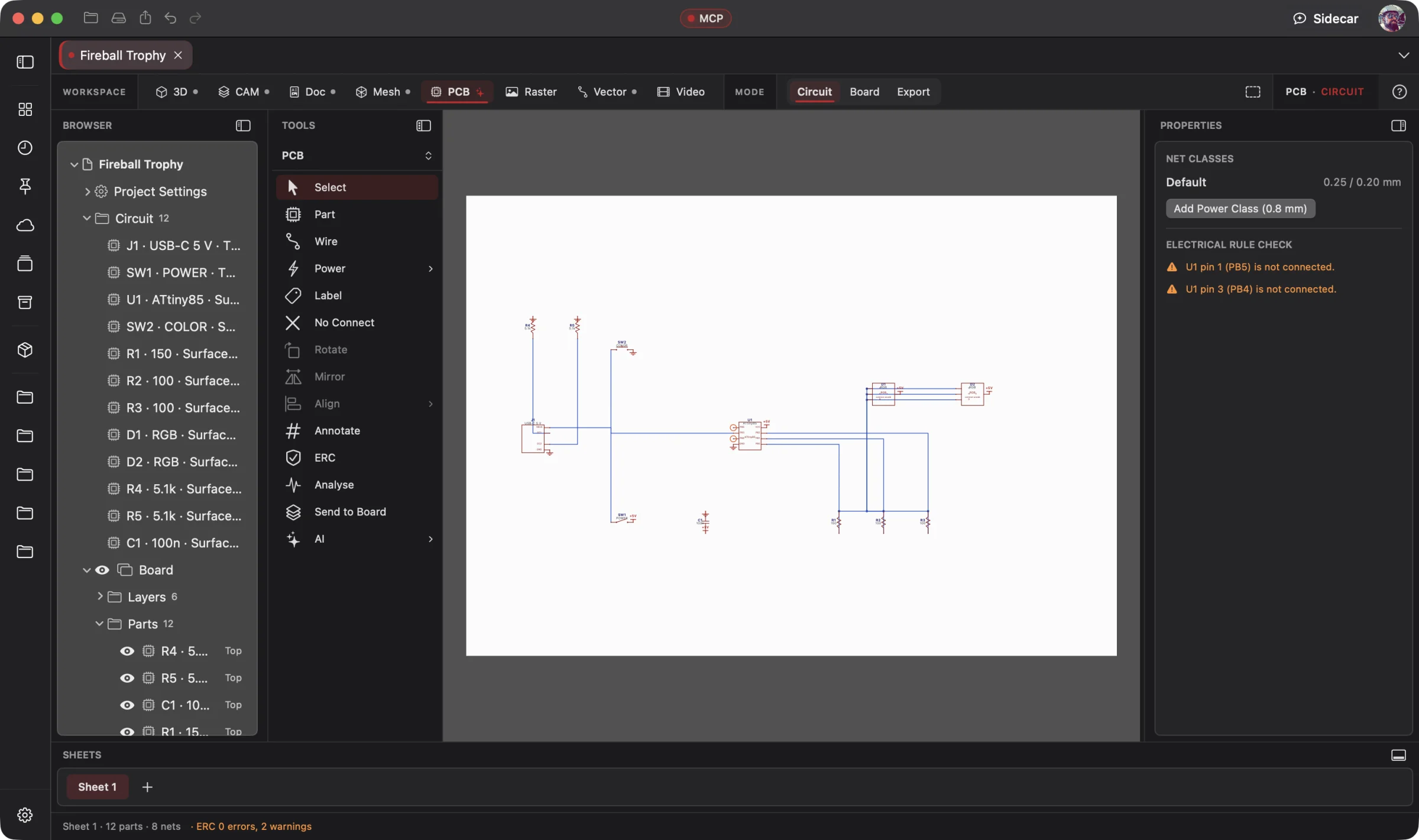 Enlarge
Circuit Editing
Work on the light circuit with the component list, schematic tools and electrical checks in view.
PCB Workspace
Describe the electronics your object needs. Your AI designs the schematic and board, checks the circuit and fits it into the 3D enclosure, then prepares fabrication and assembly files for review.
Connect your preferred AI through native MCP, use Wrangler to manage your providers and supported local models, or choose built-in Sidecar for focused work. Your AI creates; you direct, review and refine. Explore AI Workflows
Free 3D Workspace · One project · No credit card
macOS · Windows · Ubuntu · iOS · iPadOS · Android
 Enlarge
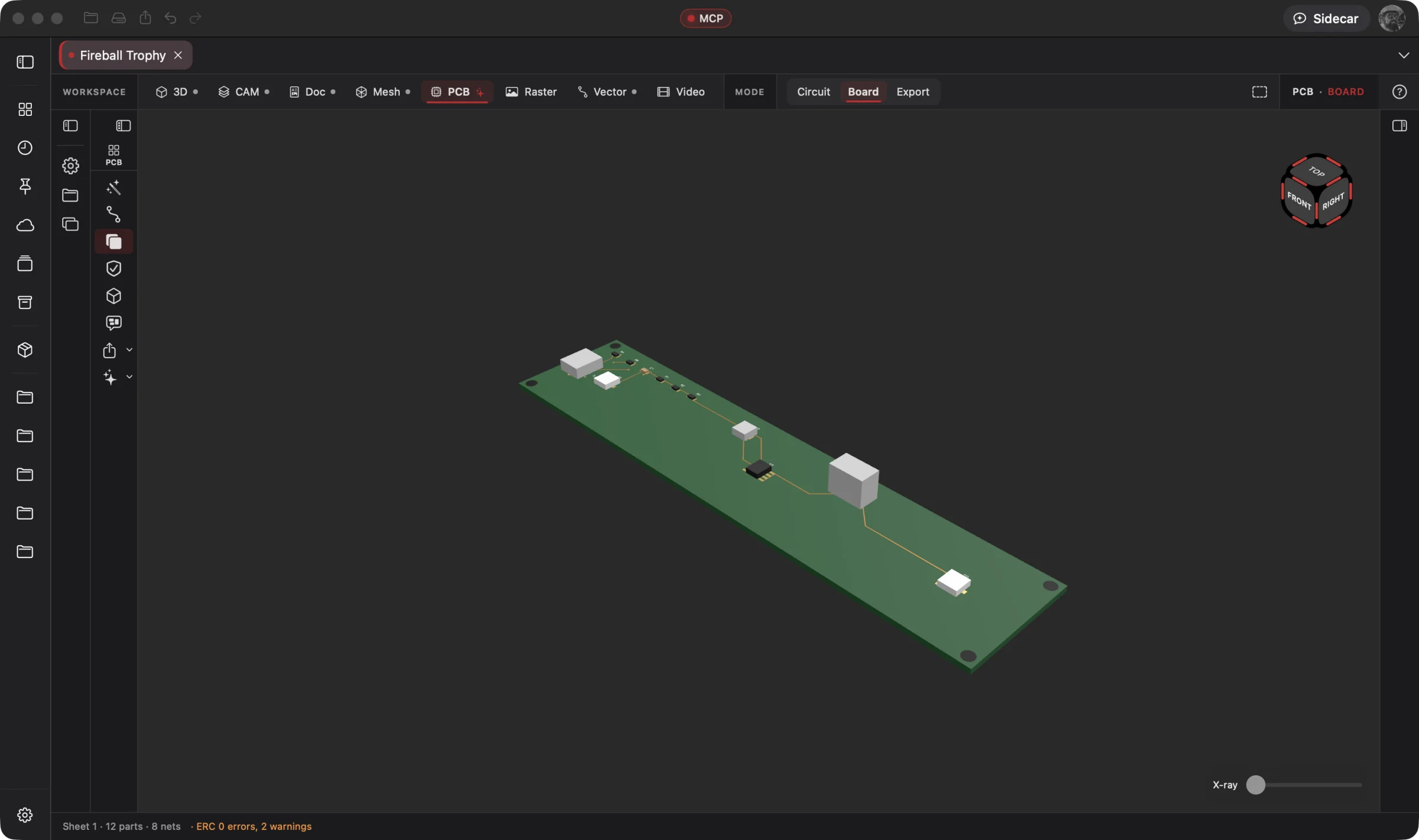
The trophy's light board in the PCB Workspace, part of the same project as the enclosure and assembly.
PCB is part of one AI-driven design workflow: a reference image becomes artwork, physical parts, manufacturing jobs, electronics, assembly instructions and a product video. Your AI works across all eight workspaces in one project; you steer and review.
Bring an idea or the design you already started. Through native MCP, your AI sees the project geometry and makes real changes. Fireball Wrangler brings your provider accounts and supported local models together, with discovery and connection to Fireball apps when their MCP access is enabled. Built-in Sidecar handles focused tasks.
Full editing goes with you: native apps across macOS, Windows, Ubuntu, iOS, iPadOS and Android. Use touch, Apple Pencil on supported iPads, or mouse and keyboard. Windows to Mac to Ubuntu, the same .fireballdesign file keeps every workspace together. Choose cloud sync to continue on your phone, tablet or computer.
Designer is in pre-release. This site describes the complete product; download availability follows the published builds. AI capabilities depend on your chosen model and tool support.
The Fireball Trophy Project
Real screenshots from Designer v0.19.0 on macOS. Open any image for a closer look.
Before and after
Today
One app for the schematic, another for the board, a third for the case, and a connector that hits the wall when the parcel from the fab shows up.
With Fireball Designer
A circuit checked in plain words, a routed board in one click, the board sitting in the 3D model as real solids, and a fab zip that uploads as it is.
The bridge: the PCB Workspace's Make Board, Push to 3D and fit check in one project file, with Sidecar running the checks for you.
What it’s for
The PCB Workspace has two modes. Circuit is a clean schematic editor with standard symbols, live ERC and a DC “will it work?” check. Board is the board as a 3D object in one view: no stack of 2D editors to keep straight.
It is built for makers whose board lives inside something they also design. The board goes into the 3D Workspace as solids, the enclosure is modelled around it, and a fit check tells you if the USB-C port reaches the wall.
Headline features
Wires that square themselves and snap to pins, net labels and power symbols that join across sheets, buses, hierarchical sheets, rubber-banding and copy with renumbering, on familiar W/P/L/R keys.
For you: fast, familiar entry that scales past toy circuits.
Finds shorted supplies, fighting outputs, unconnected pins, ICs with no power (traced through fuses, inductors and switches), duplicate designators and dangling wires, ringed on the canvas.
For you: catch the mistake on screen, not on the bench.
Set “VIN is 24 V, 2 A max” and Designer solves every net's voltage and every part's current and power, then says in plain words which LED won't light, which resistor overheats and which regulator lacks headroom.
For you: an engineer's sanity check before you pay for boards.
Sizes a two-layer outline, places every part in the schematic's arrangement, routes by net class with supplies first, pours ground, adds mounting holes and runs DRC.
For you: a checked circuit becomes a first board in one step.
45° routing with rip-up and retry, clearance measured edge to edge. On the 60-part Powerup Stations board under JLCPCB rules: nothing unrouted, no clearance errors, in 1.6 seconds.
For you: the board is done, not 90% done.
Generic parts with standard footprints and LCSC, DigiKey and Mouser part numbers, and a best-fit 3D body for every part, with representative geometry for checking the layout.
For you: the board in 3D looks like the board you'll get.
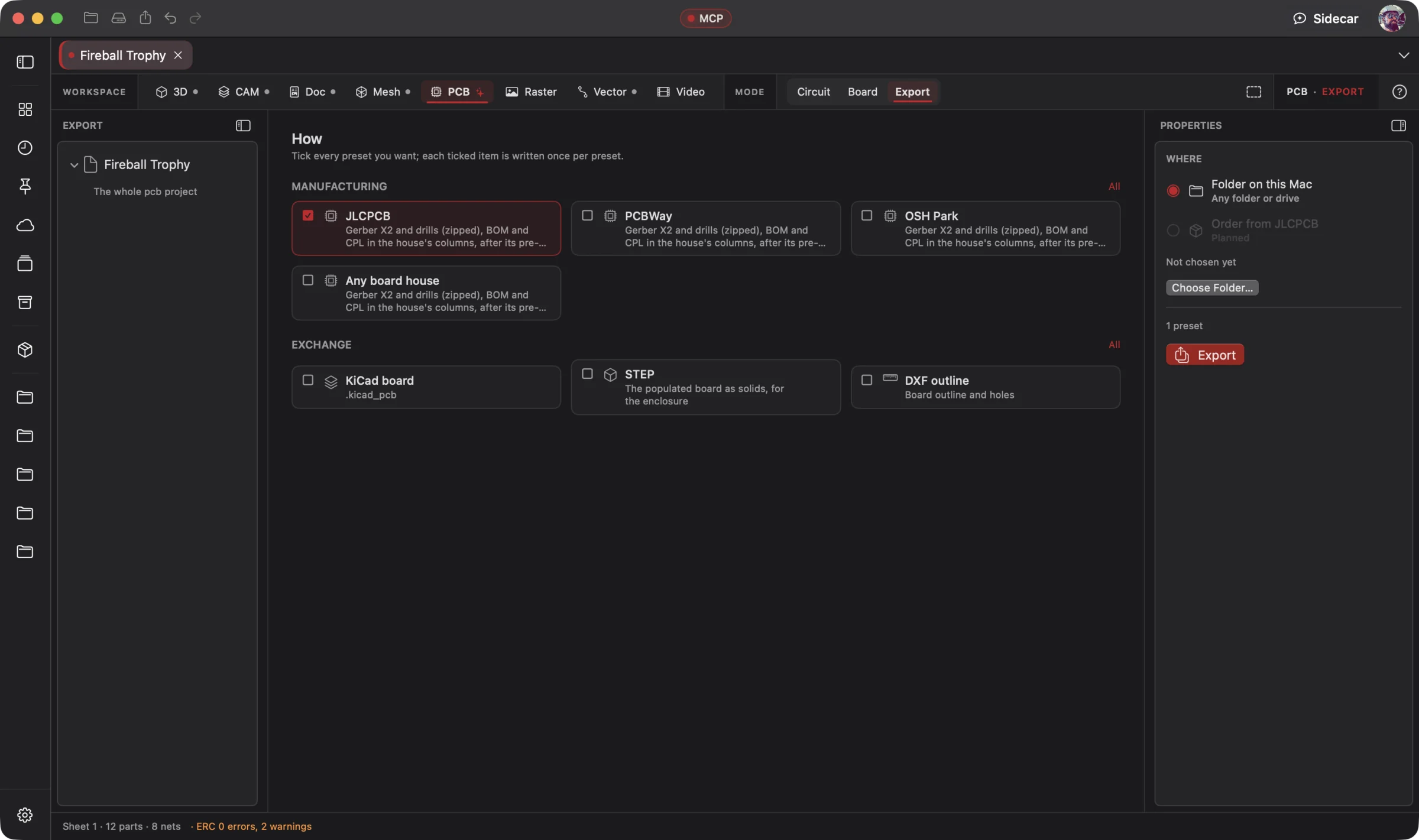
Stack-up, copper weight, mask and silk colour and finish, with design rules taken from the house's limits plus a margin, and a pre-flight against each house before you export.
For you: check your design against the selected fabrication rules before uploading it.
The board, its mounting holes and every part go into the 3D Workspace as solids; pull the outline back from an enclosure; check clearances, USB-C reach and charging-coil alignment.
For you: spot connector and enclosure conflicts before ordering parts.
A priced bill of materials with a cart hand-off, an automatic 3D parts library, and a virtual supply, meter and scope with transient and AC simulation.
For you: order the parts and scope the circuit without leaving Designer.
Built-in Sidecar
Sidecar helps interpret circuit checks and run a focused command on a prepared schematic, such as Make Board. Review the electrical and design-rule results before manufacturing.
You
Check my circuit, then make me a 3D board for JLCPCB.
Sidecar
→ ERC clean · VIN set to 24 V · DC check explained in plain words, with fixes · JLCPCB rules · board made and routed · ground poured · DRC run, anything left listed. Undo available.
Small tasks are Sidecar’s sweet spot. Quick explanations, a focused edit or help running a built-in tool. Longer projects and repeated tool calls can use Credits quickly.
Sidecar Bronze is included with Designer Pro and Commercial at no extra charge; other plans can use its free tier. Designer works completely with the panel closed.
Find the right AI help for your work →MCP · bring your own assistant
Connect your preferred compatible AI to Designer through native MCP. Let it inspect the actual project, create the first draft and refine the design through editable, undoable tool calls.
All 38 PCB tools are on MCP, and an agent wires by pin name (U1.VIN) rather than coordinates. Your assistant can work through circuit design, checks, board layout and order files with you. Review the results at each stage.
# Claude Code, connected to Fireball Designer over MCP
> Design a USB-C powered 3.3 V board with a status LED, make the board, give me JLCPCB files and show it to me in 3D.
A clean ERC, 3.3 V on the regulator output, a routed board, a folder with the fab zip, BOM, pick-and-place and STEP, and the populated board in 3D, ready for its enclosure.
Example prompt and the tool calls it takes. Designer’s MCP server is built into the app, off until you switch it on, and scoped to what you share. No Sidecar subscription is needed. Your assistant uses its own provider account, billing and usage limits; review its work before using the result.
Workflows
One project, every workspace
Every workspace keeps its work in the same .fireballdesign file, so a hand-off is a button (or one tool call), not an export and a re-import.
Fireball Designer Warehouse connects the maker community to your studio. Discover shared projects, like the ideas you love, save them to collections and follow the makers, then open a design and make it yours within its sharing terms. Ask your AI for changes, prepare your build and share what you learn with the next maker. Find It. Make It Yours.
check_board_fit).
make_pcb_pages).
Preliminary pricing
Unlimited 3D projects start at $5 a month. Add the PCB Workspace for another $5 a month: $10 total (or $110 a year). Designer Pro includes all eight workspaces for $25 a month. You can start with one 3D project for free. One Fireball account works across your Fireball apps. Under ten employees you sell what you make on any paid plan.
See Designer plansFAQ
It opens .kicad_sch (versions 6 to 10) and Eagle .sch schematics, .kicad_sym symbol libraries and STEP part models. It writes a Gerber X2 and Excellon fab zip, BOM and pick-and-place in each house's columns, .kicad_pcb, DXF and STEP.
One or two copper layers, which covers most maker boards.
Make Board routes every net in one command, with a thorough mode that rips up and retries the hard ones. You can route by hand afterwards.
It solves the DC operating point and explains the results, with transient and AC simulation on a virtual bench.
Native apps across macOS, Windows, Ubuntu, iOS, iPadOS and Android, with full design editing on mobile. Use touch, Apple Pencil on supported iPads, or mouse and keyboard. The same .fireballdesign file carries your project across platforms; choose cloud sync to continue on another device. Download availability follows the published pre-release builds.
Designer is free to start. The PCB Workspace is one of the $5-a-month add-ons, or part of Designer Pro. Pricing is a draft until launch.