Doc · Document Export
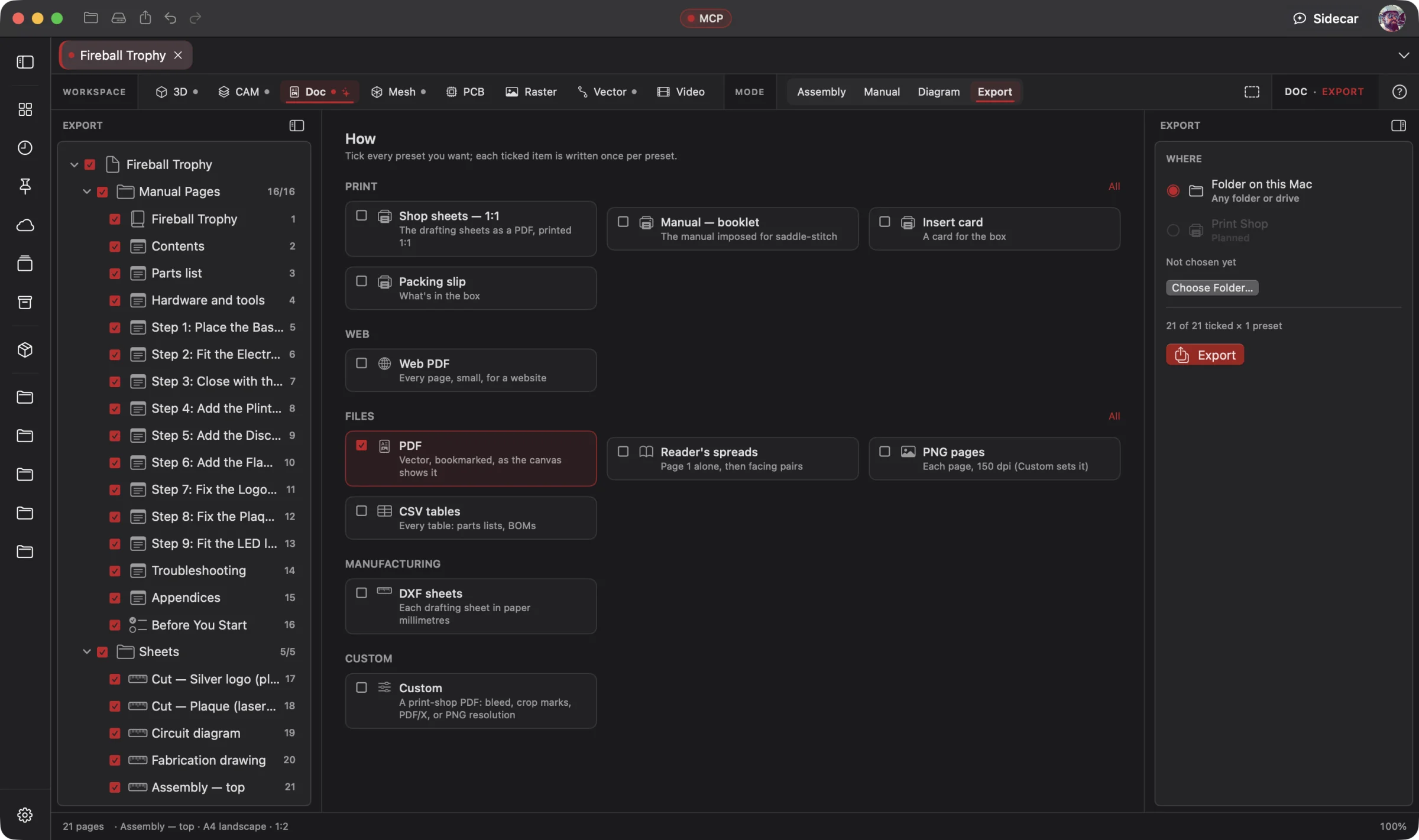 Enlarge
Document Export
Choose a shop-sheet pack, a manual booklet or individual document files from the Doc export screen.
Doc Workspace
Your AI turns the project into assembly instructions, shop drawings, parts lists and build documentation, connected to the design. Get the first draft of the guide alongside the parts.
Connect your preferred AI through native MCP, use Wrangler to manage your providers and supported local models, or choose built-in Sidecar for focused work. Your AI creates; you direct, review and refine. Explore AI Workflows
Free 3D Workspace · One project · No credit card
macOS · Windows · Ubuntu · iOS · iPadOS · Android
 Enlarge
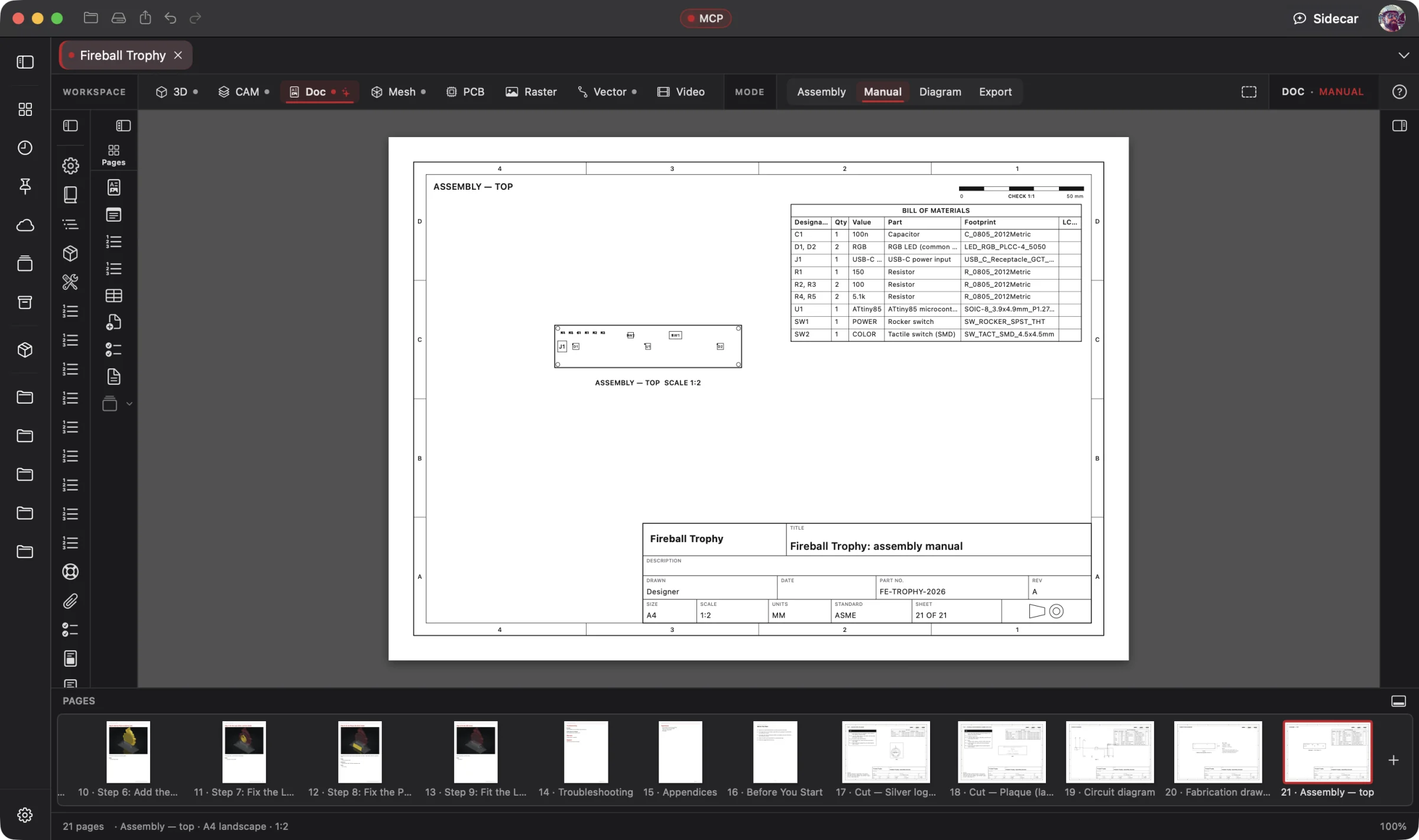
A sheet from the trophy's 21-page document, with its parts list and the manual's page strip visible.
Doc is part of one AI-driven design workflow: a reference image becomes artwork, physical parts, manufacturing jobs, electronics, assembly instructions and a product video. Your AI works across all eight workspaces in one project; you steer and review.
Bring an idea or the design you already started. Through native MCP, your AI sees the project geometry and makes real changes. Fireball Wrangler brings your provider accounts and supported local models together, with discovery and connection to Fireball apps when their MCP access is enabled. Built-in Sidecar handles focused tasks.
Full editing goes with you: native apps across macOS, Windows, Ubuntu, iOS, iPadOS and Android. Use touch, Apple Pencil on supported iPads, or mouse and keyboard. Windows to Mac to Ubuntu, the same .fireballdesign file keeps every workspace together. Choose cloud sync to continue on your phone, tablet or computer.
Designer is in pre-release. This site describes the complete product; download availability follows the published builds. AI capabilities depend on your chosen model and tool support.
The Fireball Trophy Project
Real screenshots from Designer v0.19.0 on macOS. Open any image for a closer look.
Enlarge
Choose a shop-sheet pack, a manual booklet or individual document files from the Doc export screen.
Before and after
Today
Screenshots pasted into a word processor, dimensions typed by hand, a parts list in a spreadsheet, and a manual that's wrong as soon as the design changes.
With Fireball Designer
Drawings, dimensions and parts lists that update with the model, a cut page for every CAM setup, a customer manual from the same file, and anything stale flagged before it prints.
The bridge: Make Shop Pages writes the whole shop set in one command, and Sidecar can help draft a short section from your product facts.
What it’s for
The Doc Workspace has three modes. Assembly is drafting for the shop floor: hidden-line views, dimensions, weld symbols and a cut, bend and weld set. Manual is page layout for the customer: warnings, what's in the box, setup steps, care and troubleshooting. Diagram puts your PCB circuit on paper.
All of it is built from the model, not pasted from screenshots. Change a hole in 3D and the dimension, the callout and the parts list follow; anything whose source is gone says OUT OF DATE instead of printing a wrong number.
Headline features
Base, projected and one-click standard views from exact solids, plus section (full, half, offset, aligned), detail, break, exploded, flat-pattern and CAM-nest views. Scanned meshes draw too.
For you: the drawing is the part, not a picture of it.
Linear, aligned, diameter, radius, ordinate, baseline, chain and angular, with tolerances. Auto Dimension adds overall sizes, one diameter per hole size and centre marks.
For you: the numbers on paper are the numbers in the model, and lost geometry shows as stale.
All 14 feature-control characteristics, datums, surface texture, and full weld symbols, AWS A2.4 under ASME and ISO 2553 under ISO. ANSI A to E and ISO A0 to A5 sheets with a real title block.
For you: fabricators get the notation they expect.
One command, in shop order: a before-you-start checklist, a cut page per CAM setup, a bend table, a weld page with balloons and a hardware table. Run it again and it refreshes in place, keeping your edits.
For you: the build sheet exists the moment the design does.
Numbered, tickable lines that read the model (“Cut 3 parts from 3.17 mm steel on the CrossFire PRO”). Ticks belong to a named print run and never print.
For you: a live checklist per build, never baked into the drawing.
Text that flows across frames and pages, master pages, styles, tables, a table of contents, cross-references that follow reflow, find and replace, and four ready templates: electrical manual, product insert, care card and quick-start.
For you: a customer manual without a second app.
ANSI Z535.6 signal panels, ISO 7010-style pictograms, Important Safety Instructions, small-parts and coin-battery warnings, FCC Part 15 and Prop 65, filled in and listed for review. Drafting help, not legal advice.
For you: US-market wording, laid out properly, without a blank page.
Tagged vector PDF with fonts and clickable QR codes, saddle-stitch booklets, 1:1 shop sheets with a CHECK bar, DXF with editable dimensions, CSV tables and PNG, after a preflight check.
For you: one document prints right at the shop, the print shop and the customer's desk.
Generated illustrations for manuals, and packing slips merged from your Shopify, Etsy or eBay orders.
For you: a packing slip per order, straight from the shop.
Built-in Sidecar
Use Sidecar for a short instruction, a clearer caption or help running Make Shop Pages on your model. The result is ordinary Doc content you can review and edit.
You
Make the shop instructions for what we built, and tell me what to check before it goes to the shop.
Sidecar
→ read the model · checklist · a cut page per CAM setup · weld page with balloons · hardware table · each sheet auto-dimensioned. Check: the plate thickness and the weld sizes. Undo available.
Small tasks are Sidecar’s sweet spot. Quick explanations, a focused edit or help running a built-in tool. Longer projects and repeated tool calls can use Credits quickly.
Sidecar Bronze is included with Designer Pro and Commercial at no extra charge; other plans can use its free tier. Designer works completely with the panel closed.
Find the right AI help for your work →MCP · bring your own assistant
Connect your preferred compatible AI to Designer through native MCP. Let it inspect the actual project, create the first draft and refine the design through editable, undoable tool calls.
All 54 Doc tools are on MCP: read the model, lay out a manual, add warnings and QR codes, preflight, export. Your agent plans from one read of the model and builds with the same tools a person uses.
# Claude Code, connected to Fireball Designer over MCP
> Make the customer manual for the Powerup Station: plug the supply into the back, then the wall; phone on top, Watch on the back, AirPods below. Support is fireballenterprise.com/support. Print it as an A5 booklet.
A cover, Important Safety Instructions, what's in the box, numbered steps, troubleshooting, FCC and Prop 65 statements and clickable QR codes, imposed as a saddle-stitch booklet.
Example prompt and the tool calls it takes. Designer’s MCP server is built into the app, off until you switch it on, and scoped to what you share. No Sidecar subscription is needed. Your assistant uses its own provider account, billing and usage limits; review its work before using the result.
Workflows
One project, every workspace
Every workspace keeps its work in the same .fireballdesign file, so a hand-off is a button (or one tool call), not an export and a re-import.
Fireball Designer Warehouse connects the maker community to your studio. Discover shared projects, like the ideas you love, save them to collections and follow the makers, then open a design and make it yours within its sharing terms. Ask your AI for changes, prepare your build and share what you learn with the next maker. Find It. Make It Yours.
makeHowToVideo), and its QR code links to it.
Preliminary pricing
Unlimited 3D projects start at $5 a month. Add the Doc Workspace for another $5 a month: $10 total (or $110 a year). Designer Pro includes all eight workspaces for $25 a month. You can start with one 3D project for free. One Fireball account works across your Fireball apps. Under ten employees you sell what you make on any paid plan.
See Designer plansFAQ
Views regenerate, dimensions and callouts re-read the model, and anything whose target is gone is flagged OUT OF DATE before you print.
Vector PDF (tagged, fonts embedded, clickable links), saddle-stitch booklets, reader's spreads, DXF with editable dimensions, CSV tables and PNG. DWG isn't written.
Both. Document Settings switches between ASME (third angle) and ISO (first angle) projection and weld notation.
It follows the published standards (ANSI Z535.6, ISO 7010, FCC Part 15, Prop 65) and preflight lists every regulatory block for review, but it's drafting help, not legal advice.
Native apps across macOS, Windows, Ubuntu, iOS, iPadOS and Android, with full design editing on mobile. Use touch, Apple Pencil on supported iPads, or mouse and keyboard. The same .fireballdesign file carries your project across platforms; choose cloud sync to continue on another device. Download availability follows the published pre-release builds.
Designer is free to start. The Doc Workspace is one of the $5-a-month add-ons, or part of Designer Pro. Pricing is a draft until launch.