3D · Editable Assembly
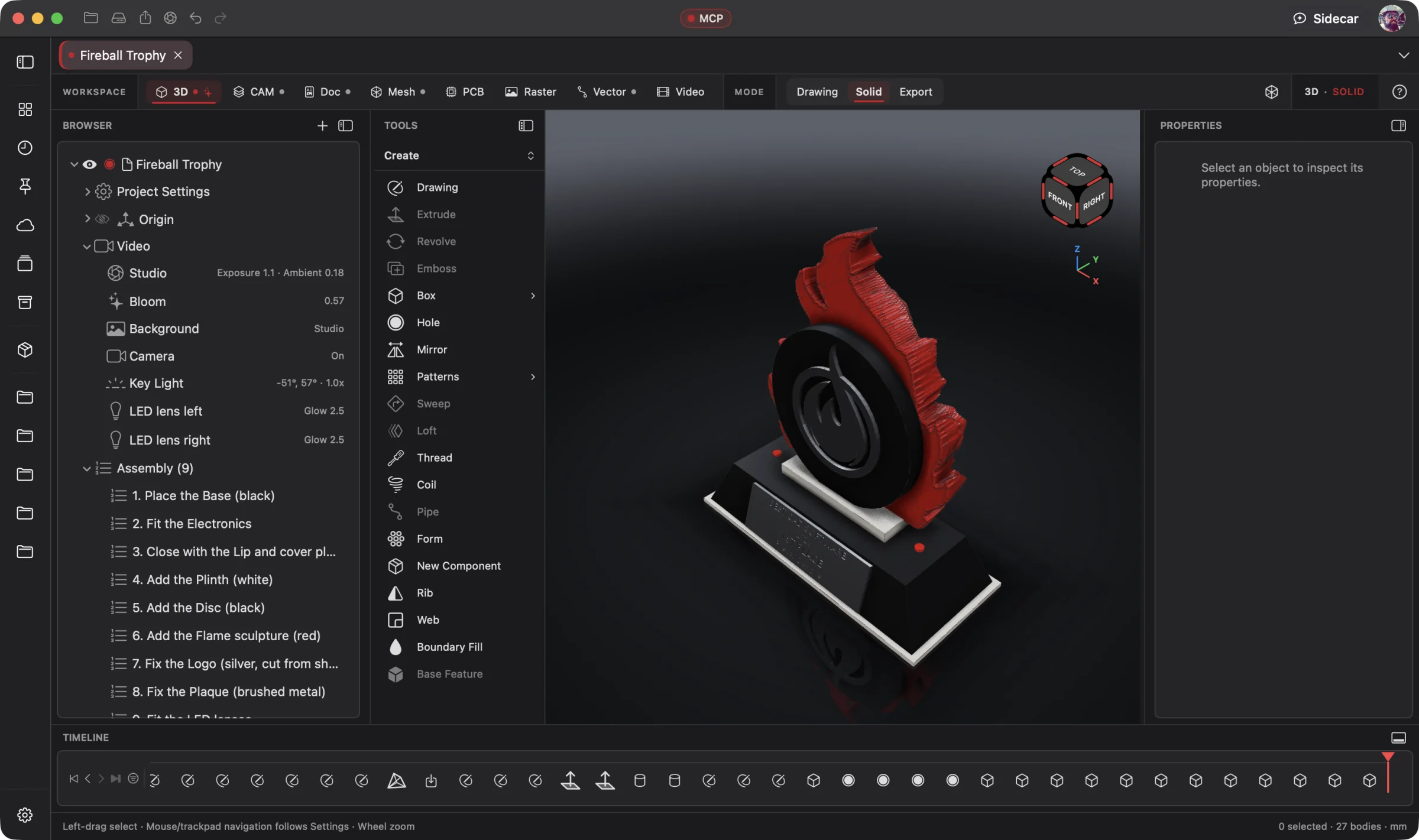 Enlarge
Editable Assembly
Open the project browser and modeling tools to work with the trophy's parts and assembly steps.
3D Workspace
Give your AI the part you need or the CAD project you already started. It builds and refines parametric solids, sheet metal and assemblies, with editable history and files for fabrication. You direct and review.
Connect your preferred AI through native MCP, use Wrangler to manage your providers and supported local models, or choose built-in Sidecar for focused work. Your AI creates; you direct, review and refine. Explore AI Workflows
Free 3D Workspace · One project · No credit card
macOS · Windows · Ubuntu · iOS · iPadOS · Android
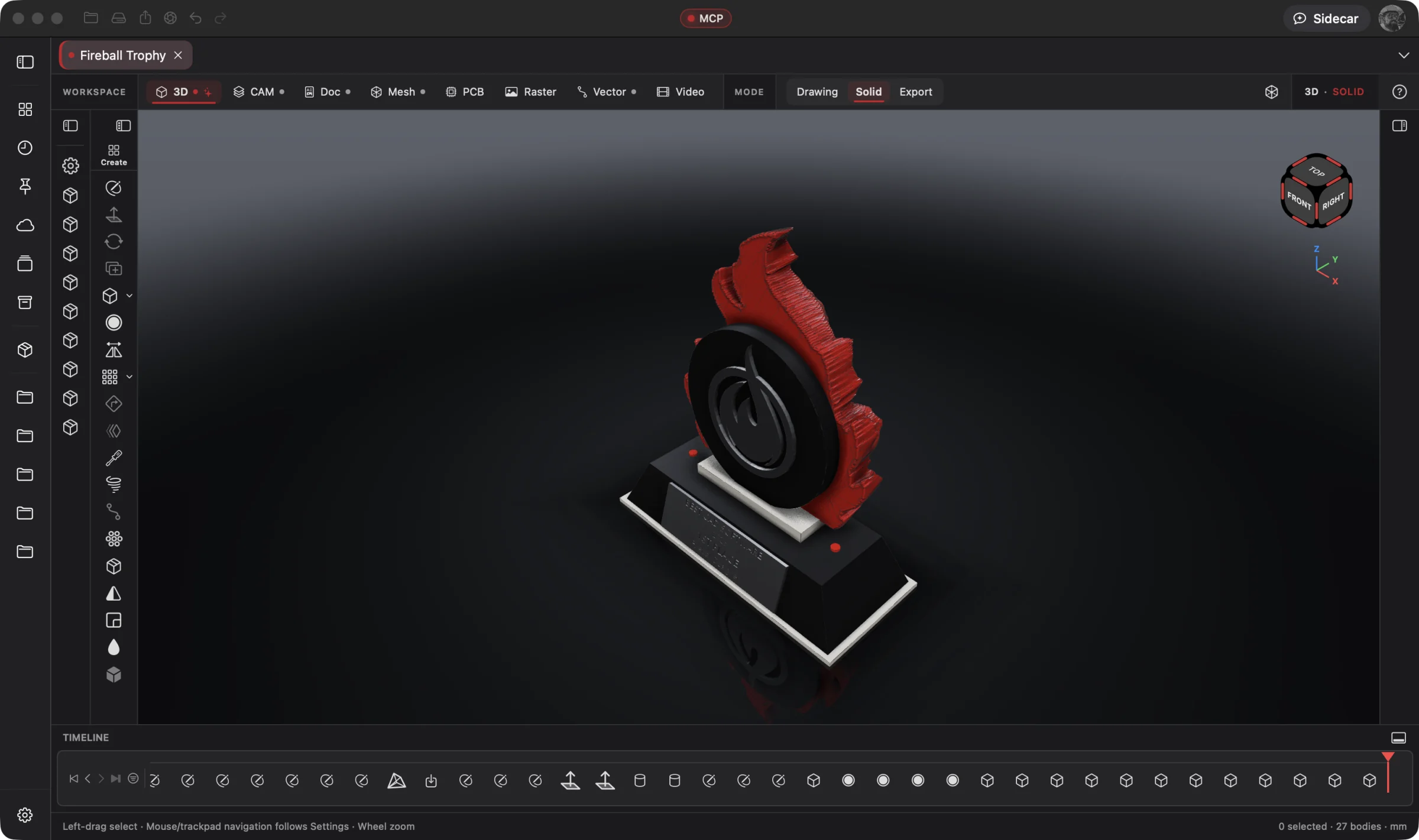 Enlarge
The trophy assembly in the 3D Workspace, with its model history along the bottom.
3D is part of one AI-driven design workflow: a reference image becomes artwork, physical parts, manufacturing jobs, electronics, assembly instructions and a product video. Your AI works across all eight workspaces in one project; you steer and review.
Bring an idea or the design you already started. Through native MCP, your AI sees the project geometry and makes real changes. Fireball Wrangler brings your provider accounts and supported local models together, with discovery and connection to Fireball apps when their MCP access is enabled. Built-in Sidecar handles focused tasks.
Full editing goes with you: native apps across macOS, Windows, Ubuntu, iOS, iPadOS and Android. Use touch, Apple Pencil on supported iPads, or mouse and keyboard. Windows to Mac to Ubuntu, the same .fireballdesign file keeps every workspace together. Choose cloud sync to continue on your phone, tablet or computer.
Designer is in pre-release. This site describes the complete product; download availability follows the published builds. AI capabilities depend on your chosen model and tool support.
The Fireball Trophy Project
Real screenshots from Designer v0.19.0 on macOS. Open any image for a closer look.
Enlarge
Open the project browser and modeling tools to work with the trophy's parts and assembly steps.
Before and after
Today
One app for the model, a slicer for the print, another app for the listing photo, and a licence that jumps the moment your side project starts selling.
With Fireball Designer
One native design studio from the first sketch to a print-ready 3MF, with the render, color variants and flat pattern in the same cross-platform project file.
The bridge: the 3D Workspace keeps an editable history, so changing your mind is a number, not a redo. Sidecar and your own agent drive the same features you do.
What it’s for
The 3D Workspace is Fireball Designer's home: professional history-based parametric CAD on an exact geometry kernel, with an AI built in. Draw a profile, drive it with dimensions and named parameters, turn it into solids, then go back and change a number: everything downstream rebuilds.
It is where most projects start and where the other workspaces meet. Vector artwork lands here as drawings, PCB boards arrive as solids for an enclosure fit, meshes get modelled over, and CAM, Doc and Video all read the same model.
Headline features
Drawings with driving dimensions, expressions and named parameters, then Extrude, Revolve, Sweep and Loft with guide curves.
For you: change one number and the whole part follows, instead of starting over.
Fillet, Chamfer, Shell, Draft and Holes, including counterbores, countersinks and modelled metric threads with print clearance.
For you: features stay features. Edit a hole next week and it is still a hole, not a subtracted cylinder.
Flanges with real bend constants, bend allowance from the K-factor and gauge tables, and a flat pattern with its bend lines.
For you: a bent bracket unfolds into a cut file for CAM without redrawing it.
Press Pull, Replace Face, Offset and Remove Faces, Simplify, Boundary Fill, Silhouette Split, Web and Rib.
For you: a STEP file with no history is still editable. Push a face, drop a fillet, move on.
Components, placed occurrences, linked parts from other projects, and configurations that swap parameters and colour variants.
For you: the red one and the black one, or the 60 mm and 80 mm size, live in one file.
Drop in a photo, calibrate it to a known size, and trace it into editable outlines. Attach a photo in Sidecar and say “make that”.
For you: copying a broken part or a sketch on paper starts from the real shape.
A studio renderer with saved lighting, capped section views, and measurements for distance, interference and mass.
For you: the listing photo and the fit check both come from the model itself.
STEP, STL and 3MF, with Bambu and Orca print settings and colours per face; named versions saved inside the file.
For you: what leaves Designer opens in your slicer the way you set it up.
Knurls, grips and surface patterns that come out in the print.
For you: texture a handle without sculpting it by hand.
Built-in Sidecar
Sidecar docks beside the viewport for quick explanations and focused edits, such as a hole, a fillet or a material change. It uses real features in the history, with Undo for each step.
You
Add two M5 countersunk holes to the base and one to the upright, round every edge 1 mm, and make it brushed aluminium.
Sidecar
→ 3 countersunk holes (M5, 90°) · fillet r 1 on every edge · appearance: aluminium 6061, 2.7 g/cm³. Each feature is its own step in the timeline. Undo available.
Small tasks are Sidecar’s sweet spot. Quick explanations, a focused edit or help running a built-in tool. Longer projects and repeated tool calls can use Credits quickly.
Sidecar Bronze is included with Designer Pro and Commercial at no extra charge; other plans can use its free tier. Designer works completely with the panel closed.
Find the right AI help for your work →MCP · bring your own assistant
Connect your preferred compatible AI to Designer through native MCP. Let it inspect the actual project, create the first draft and refine the design through editable, undoable tool calls.
Point Claude Code, Codex or any MCP client at Designer and it gets the same 3D tools Sidecar has: inspect, draw, extrude, drill, fillet, render. Every write is checked against the project's revision, so it can't edit a model that changed under it.
# Claude Code, connected to Fireball Designer over MCP
> Model a 3 mm aluminium L-bracket: 60 mm base, 40 mm upright, 30 mm wide, two M5 countersunk holes in the base and one in the upright, 1 mm fillets. Then show me a section through the holes.
One solid with an editable history (profile, extrude, three holes, fillet), every step undoable, and a capped section showing the countersinks.
Example prompt and the tool calls it takes. Designer’s MCP server is built into the app, off until you switch it on, and scoped to what you share. No Sidecar subscription is needed. Your assistant uses its own provider account, billing and usage limits; review its work before using the result.
Watch it work
Silent, looping clips recorded in Designer itself. They play when you scroll to them, and stay still if you prefer reduced motion.
Workflows
One project, every workspace
Every workspace keeps its work in the same .fireballdesign file, so a hand-off is a button (or one tool call), not an export and a re-import.
Fireball Designer Warehouse connects the maker community to your studio. Discover shared projects, like the ideas you love, save them to collections and follow the makers, then open a design and make it yours within its sharing terms. Ask your AI for changes, prepare your build and share what you learn with the next maker. Find It. Make It Yours.
create_cam_setup).
Preliminary pricing
Start with one 3D project for free: no card, no trial. Unlimited 3D projects are $5 a month. Add other workspaces for $5 each per month, or get all eight with Designer Pro for $25 a month. One Fireball account works across your Fireball apps. Under ten employees you sell what you make on any paid plan.
See Designer plansFAQ
Yes. The 3D Workspace is free forever, with no card and no trial. The Free plan holds one project, with no watermark and no locked geometry. Pricing is still a draft until Designer ships.
Yes, through STEP. Designer opens it exact, with names, colours and assemblies intact, and SVG and DXF drawings come in too. History and sketches don't travel in STEP from any app, so imported parts are edited with the direct-edit tools.
Yes: modelled metric threads with a print clearance, not a cosmetic texture. They haven't been fit-tested on hardware yet, so print a test piece before a batch.
No. Designer works completely with the Sidecar panel closed. Sidecar is an optional add-on with its own free tier, and Designer's own MCP server needs no add-on at all.
Native apps across macOS, Windows, Ubuntu, iOS, iPadOS and Android, with full design editing on mobile. Use touch, Apple Pencil on supported iPads, or mouse and keyboard. The same .fireballdesign file carries your project across platforms; choose cloud sync to continue on another device. Download availability follows the published pre-release builds.